Open a public web page through ProxyLite without installing software. Compare web and residential proxies, review privacy limits, and reproduce our checks.
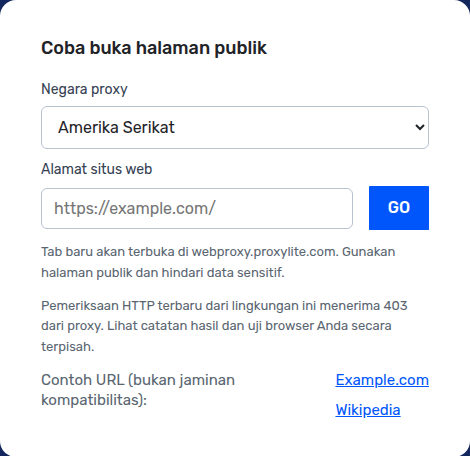
This form sends the chosen country and URL to webproxy.proxylite.com. It opens a new tab; it does not change your browser or device proxy settings. A residential proxy is a separate product: you configure an endpoint and credentials in a compatible client. This web form does not establish that its exit IP is residential.
Different tools, different traffic coverage
Question
Web Proxy
Residential Proxy
Setup
Paste a URL into this form; opens a new tab.
Configure a proxy endpoint and credentials in a supported client.
Traffic coverage
Pages requested through this web service; not all device traffic.
Traffic routed by the configured client; not automatically all apps.
Exit IP type
This form does not verify an exit IP classification.
Product intended to offer residential exit IPs; check the actual session.
Suitable starting point
Occasional checks of public pages.
Client integrations and workflows that require proxy configuration.
Requests made by the proxy generally reach the destination from the proxy exit IP. Scripts, WebRTC, or resources loaded directly may use other paths; verify the destination-side IP instead of assuming all traffic is proxied.
What stays the same?
A proxy does not automatically change your account, cookies, browser fingerprint, device location permissions, or files already stored in your browser. A signed-in website may still identify you.
What does HTTPS protect?
HTTPS encrypts each HTTPS connection. This web proxy intermediates the page and is a separate trust boundary; HTTPS is not proof of end-to-end secrecy from the proxy operator or complete anonymity.
Avoid entering passwords, payment details, private links, or sensitive documents into a public web proxy. Check the privacy policy before use. Read the privacy policy →
Which websites work?
Start with public, mostly static pages
Plain public HTML pages are a useful first check. Example.com and Wikipedia are test starting points, not promises of current availability. Logins, video, CAPTCHA, WebSockets, downloads, and complex JavaScript may behave differently.
Speed depends on the full path
A proxy adds a network hop. Latency depends on your connection, proxy location and load, destination, and page resources. We do not promise faster browsing, cached pages, or working access to every website.
How to test a web proxy yourself
Use the same URL, browser, network, country, and observation window for direct and proxy visits. Keep failures in the results. A successful HTTP response alone does not prove a working page.
Choose a country and record the UTC time, browser version, and your network. Open the same public URL directly and through the form.
Check the main text, images, redirects, and interactions separately. For an IP check, use an endpoint you control that records the source IP; compare with the direct request.
Run at least three direct/proxy pairs. Record HTTP status, visible content, elapsed time, and all failures. Use the median, not a single best run; keep cold and warm cache runs separate.
Save a screenshot or short video with the date and country. Remove tokens, personal data, cookies, and sensitive URLs before sharing. Re-test after changing countries or networks.
Local interface capture, Indonesian version. This screenshot demonstrates the form, not successful access to a destination.
Recorded HTTP checks
These are dated HTTP GET checks from the development environment, not browser compatibility tests or a speed benchmark. An HTTP 200 only confirms a response; the content marker is checked separately. Results may differ by network, location, or date.
Proxylite is one of the most valuable provider of residential proxy service . After registration, you can contact customer service for free 500M traffic.



 Instagram
 Facebook
 eBay
eBay
 Amazon















 Contact us for